
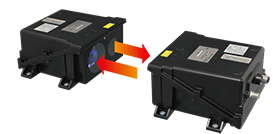
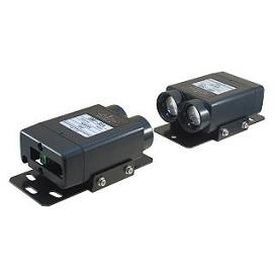
DWF-20LE

Transmission distance 200m, Ethernet 100Mbps optical repeater. Industrial field networks such as EtherCAT is available. Optical communication enables wireless communication between moving devices such as stacker cranes (automated warehouses), automatic cranes, and traversers. Just like a LAN cable, image transmission between network cameras, etc. is also possible.
Overview
Possible to connect directly to Ethernet line
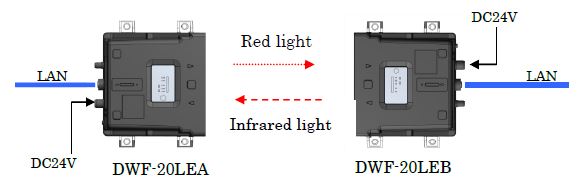
Long-distance transmission 200m
Easy to adjust the optical axis
Safe for your eyes with laser class 1
Model
| Model No. | Part No. | Transmission distance |
| DWF-20LEA | WDWF001 | 200m |
| DWF-20LEB | WDWF002 |
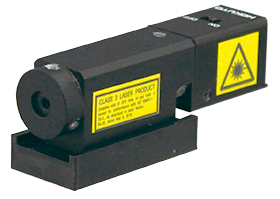
Option : Optical axis adjuster
Specification
| Model | DWF-20LEA | DWF-20LEB |
| Transmission distance | 200m | |
| Directional angle | Full angle 1° | |
| Power supply | DC24V (±10%) | |
| Current consumption | 150mA(DC24V) | |
| Transmission method | Full-duplex two-way transmission | |
| Transmission speed | 100Mbps | |
| Wavelength | 658nm(Red light) | 830nm(Infrared light) |
| Laser safety | Class 1 | |
| Interface | Ethernet | |
| Communication standard | IEEE802.3u 100BASE-TX With Auto-Negotiation function |
|
| Modulation method | Direct modulation | |
| Connection | M12 connector for Ethernet communication (M12/4P) D-coding/female M12 connector for power supply and warning (M12/5P) A-coding/male |
|
| Weight | 800g | |
| Dimensions(W×D×H) | 165mm×144mm×70mm | |
| Ambient temperature/ humidity |
-10℃ to +50℃ 85%RH or less (without dew, frost) | |
| Ambient illuminance | 10000lx or less (Halogen/mercury lamp) | |
| Impact resistance | 490m/s2 X,Y and Z directions each 10 times | |
| Vibration resistance | 10 to 55Hz double amplitude of 1.5mm for 2 hours in each X, Y and Z direction | |
| Protective structure | IP65 | |
| Reception output(CD) | Photo-coupler open collector (pressure resistant 36V), ON during light reception (Max.50mA, residual voltage 1.5V) |
|
| Level voltage output (Analog output) |
Approx.0 to 3V M8 Connector A-coding 4Pin (male) Use during optical axis adjustment only. External wiring is not possible. |
|
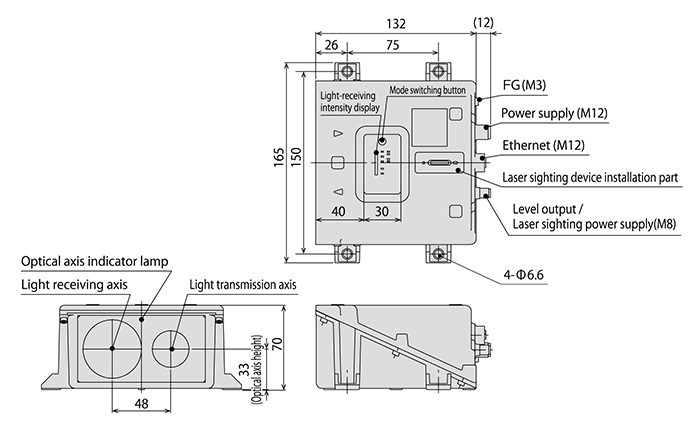
External dimension
I/O Circuit
Connection
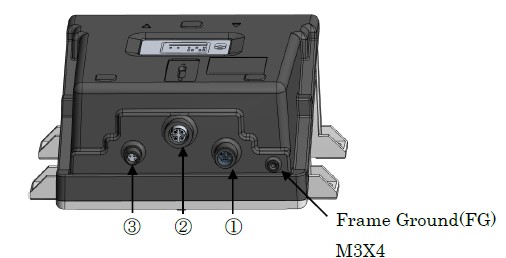
① Connector pin assignment for power supply (M12/5pin A-coding Male)
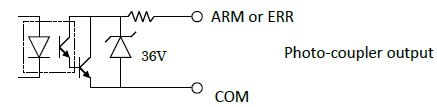
| Pin No. | Signal | I/O circuit |
| 1 | +VIN (DC24V) | Power supply input |
| 3 | -VIN (0V) | |
| 2 | ARM | NPN Photo-coupler output |
| 4 | ERR | |
| 5 | COM | |
② Connector for communication (M12/4pin D-coding Female)
| Pin No. | MDI Signal | Signal Function |
| 1 | TD + | Transmission Data (+) |
| 2 | RD + | Reception Data (+) |
| 3 | TD - | Transmission Data (-) |
| 4 | RD - | Reception Data (-) |
③ Connector pin assignment for level voltage output (M8/4pin A-coding Male)
| Pin No. | Signal | |
| 1 | Level | |
| 2 | GND | |
| 3 | Optional power supply (DC5V) | |
| 4 | Optional power supply GND | |
Downloads
Before Download
If you have not registered as a member, please register as a member by clicking the "Registration".
If you are already a member, please agree to the following terms and click the "Agree".
License for Downloading Materials
When downloading the product specifications, drawings and various types of materials and software related to the Hokuyo's product line, please read the terms of use in advance and then utilize the same with your understanding and consent. In case of dissent, please understand that you cannot register to and be recognized in the download page. (And the Terms of Use may be revised without prior notice.)
Terms of Use
- Intellectual Property Rights
-
- Copyrights and the other rights to contents such as sentences, data and software published on this Website (hereinafter referred to as "Contents") are held by Hokuyo or its suppliers.
- The secondary application (copy, diversion, defacement, analysis, transmission, assignment, rental, licensing, and usage for the purpose of business activities or commercial gain) of the Contents on this Website posted by Hokuyo is strictly prohibited without our prior approval. Specific terms of use described for each download site or Contents shall apply in preference to the Terms of Use.
- Provision of the Contents on this Website by Hokuyo means neither a transfer of the patent rights, design rights, and/or the other intellectual property rights to inventions and designs in the Contents, nor a grant of any rights based on the intellectual property rights.
- Disclaimer
-
Hokuyo pays full attention to the information that appears on this Website, but does not take responsibility for the following items:
- The information that appears on this Website is always the latest version, and is updated or corrected timely and properly;
- The information that appears on this Website is accurate, useful and safe;
- Customer's damage incurred by the use of this Website, including changes or deletions of the information, discontinuation or suspension of the publication; and
- Any and all damage incurred by using this Website.




FAQ
-
There are two types, DWF-20LEA and DWF-20LEB. How do you use them?
Please use DWF-20LEA and DWF-20LEB as a set. A and B have different wavelengths to receive the signal only from the other side.
-
Is it safe if the laser beam gets into your eyes?
The safety standard for laser light is Class 1, so there is no problem.
-
When there is a device next to each other, how far apart they should be installed?
If they are installed next to each other, they may interfere each other and cause malfunction. The interval can be calculated as below.
Spacing = (tan directivity angle x maximum usable distance) x 2 times
Directivity angle 1° Spacing (mm) = 35 x Distance (m)Also, please block the light from the other side, and check if the level lamp is not lit by the device next to each other.
-
There are normal mode, master mode and slave mode. How do you use the operation modes?
In normal mode, even if optical communication is blocked, the link is not disconnected, only the signal is blocked. It is used for signal transmission of web cameras, etc., and general LAN signal transmission of PC, etc. In master and slave mode, when optical communication is blocked, the link is automatically disconnected, so when used in an industrial open network, it is possible to notify the master station of the link disconnection. When using in an industrial open network, set the master station side in master mode and the slave station side in slave mode.
Relation Products
- Scanning Rangefinder
- Photoelectric Switch
- Sensor for Iron & Steel Industry
- Optical Data Transmission Device